Tuesday, September 30, 2008

Top Entrecard droppers of September 08

From September we have started a new program at Bloganol that is Link and Credits Love to top Entrecard droppers.In this program the link of the Top 10 Entrecard droppers will be published at Bloganol in the First week of ever month and the Top no1 Dropper will be awarded with 500 Entrecard credits.The prizes can be extended later.

And the Top 10 Droppers of September are

Dropper # of drops
Praning's Shoutout 9
Apa kamu berani lihat blog saya ini? 8
Theme lib dot com 8
Make Money Online 7
My Blogging Experience 6
BobbyT Blogging To a T 5
kahpeng.com 5
IndoContest 4
Radiology 101 3
SE7ENize.com 3

And the Winner of 500 Entrecard Credits is Praning's Shoutout

From the above data you can see that we are getting very less drops.After people knew about this program i think the no of drops will surely increase.You can see the next report of October on next month's First week.Till then have a Good Month.

U comment , U blog we Follow

I think I would have written this post before so that the users might have read this post and don't feel hesitate to Comment on this blog or Blog our content in their Blog.

We have Adopted the Policy of "U comment I follow " and "You Blog I follow".It means if you comment on our posts with your Blog Link or Blog our posts in our blog ie create a Link in Links to this post at the Footer of the main Section then your link will be Followed.

Actually to make the Links followed I have removed a code rel='nofollow' from my blog's coding.Originally, nofollow was created to stop spam. That didn't exactly work as planned. Spam still happens. I think it was stopping link love.

Now it has become a reason for Commenting at Bloganol and Blog Posts of Bloganol at your blog.Therefore start to Comment and blog start getting backLink from PR3 Bloganol.

Have a Good October.

Sunday, September 28, 2008

Design a 125X125 px Banner for Bloganol and win $10 plus 1000 EC

Its a good news to us and for all the readers that Bloganol is now PR3.So in this good day we have organized another small contest for the designers or If you know little about using Photoshop you can participate here.

Here in this contest the Participants have to design a 125X125px banner for Bloganol.The participants must involve the name of the blog and other great Topics of the blog like Make Money , Blogger Templates,etc.All sorts of the design will be accepted in this contest but the banner must be of size 125X125px.

In the case of prizes the Winner or best Designer will win $10 plus 1000 EC,The prizes can be extended later and all the Submitted designs will be featured here.So all you now have to do is create a banner and submit us using the Submit form below.

If possible Follow us at twitter to know what I am doing and Join our Mybloglog Community.All you are welcomed.

Saturday, September 27, 2008

Google Pagerank Update , Bloganol is now PR 3

Recently I read a post at Themelib and Find that the Google Pagerank has been Updated.He too got his Blog PR5.Then I checked my Blog pagerank and Find that Bloganol is now PR3 Blog.Google has updated the PR lists so fast.The Late PR update was Just two Months ago.

Bloganol is 8 months Old and is growing.In the previous Pr Update Bloganol Got PR0.I got Upset and my Friend Roshan Suggest me to request Google to analyze my Blog again.then I submitted Google a mail about my Blog's PR and Finally in this Pagerank Update we Got PR3.

Congratulation to all the Commentators because they all Got backlink from Bloganol because we have Enabled "U comment I follow" Policy in our blog.

And here are the Lists of my Favorite blog and what are they now.

Johnchow.com -> PR3
Adesblog.com -> PR2
Woork.blogspot.com -> PR6
Bloggerbuster.com -> PR5
dailyblogtips.com -> PR6
blogger-templates.blogspot.com -> PR4
jackbook.com ->PR5

Friday, September 26, 2008

Chat with your visitors with Yahoo Pingbox

Yahoo pingbox is a Widget that lets you Embed yahoo Messenger in your blog and helps you to Chat with your Visitors Privately when you are signed into yahoo Messenger.

It is very easy to Embed yahoo Pingbox into your blog.Fir this first Sign in into yahoo Pingbox and Create a new Pingbox.While creating a new Pingbox customize the Pingbox by selecting the Theme,Text and font Color,etc.You can see the Preview at right.


After you Customize the Widget Click Next Button.Then Copy the Code and Paste it in your blog by Adding a new gadget and Html/javascript.After you complete these steps you can see the widget working.

Wednesday, September 24, 2008

Page Popularity and Top popular pages widget for Blogger

You might have tired of wordpress link popularity plugin which shows the popularity of the page in terms of Percent.

So we have brought you the widget that shows Popularity of the specific post in Terms of Star Rating .So you might thing it as the Post rating widget.More stars means the page is more popular and less star means the page is less popular.This code is developed by Foxrecord.

To setup this page popularity widget below each post in Blogger Search for the code <p><data:post.body/></p> and Paste the Following code just after it.

<img expr:src='"http://foxrecord.appspot.com/rating?url=" + data:post.url + "&amp;title=" + data:post.title' /><noscript><a href="http://www.bloganol.com" title="bloganol">Code from Bloganol</a></noscript>

Further more it has also got Top popular Pages widget related on Page Popularity.For that Copy the following code and Paste it in your blog.
<script src="http://foxrecord.com/scripts/gettop.js" type="text/javascript"></script><noscript><a href="http://www.bloganol.com" title="bloganol">Code from Bloganol</a></noscript><br/><center>Powered by <a style="background: url(http://foxrecord.com/img/fox_icon16x16.gif) left no-repeat; padding-left: 20px;" href="http://foxrecord.com">FoxRecord</a></center>


4 sets of 125X125 banner for advertising designs

Leaving up the vacant Space for advertising in your blog might make your blog ugly.Therefore we have brought you a cool 4 sets of Images Labeled " Advertise here" for filling up your Advertising Space and letting users know that is the Space for advertising.

8 Images set from Tutorial Blog
Download : Right Click and Save.

3 images set from Blog2Life
125x125 - 10 dollars clear bgFree 125x125 - 5 Dollar Clear BgFree 125x125 - 10 Dollar Clear
Download : Right Click and Save.

10 images set from Romelo

Place Your Ad Here Place Your Ad Here Place Your Ad Here

Place Your Ad Here Place Your Ad Here Place Your Ad Here

Place Your Ad Here Place Your Ad Here Place Your Ad Here

Place Your Ad Here

Download : Right Click and Save.

6 images Set from Techtreak
Download the 6 different types of Your Ad here 125x125 banner ads for free!
Download


Tuesday, September 23, 2008

The result of the very First Contest

You have waited a long for the result of the First Contest at Bloganol.Now your wait is all over.Today we are going to Announce the name of the winners of this contest before it lets talk about the contest.

Although the contest was very small it has become more successful more we have thought.We got total 52 contestants in this Contest and 63 users comments on the Contest.

And the name of the First Winner is

Aerobin of Blogged up.

Congratulation Aerobin you have won $25 plus 1000EC from Bloganol

And the name of other Five Contestants who won 500 Entrecard Credits are:

Indocontest

Bm

Sherry

Eric P. Martin

The contest Blogger

Congratulation to all the winners.Contact us to get your prizes.Here are the name of all 52 participants who took part in this contest.

Contest result day announced

Friends you must have known a Contest in Bloganol Titled " $25 cash plus 1000 Entrecard Credits".Later the prize of the contest was also Updated.In this Contest will win $25 cash plus 1000 Entrecard Credits and other five winners will win 500 Entrecard Credits Each.

Till now Up to Today's date we have got Total 52 users registered in this Contest.If you are among them then there's no problem ,just wait for the result and If you are not among then ,Then submit your Contest until Tomorrow.You can get registered in this contest Upto Today and the result will be published in September 24 2008.

Best of Luck for the Result.

Reactions : A new feature from Blogger draft

Yesterday after a long time I visited blogger in draft blog and came to know the new feature of Blogger.The new feature is that now Blogger is Embedded with their own Reactions widget or hack.


All the blogger users can access this service.To enable Blogger Reactions in your blog log in to http://draft.blogger.com/ and go to your Layouts page. From there, click the “Edit” link for the Blog Posts gadget and then check the “Reactions” checkbox. You can edit the Reactions buttons by clicking "Edit" or clicking the buttons themselves as shown in the Image below.

You can customize the position of reactions within the post by dragging in the arrange items box.You can customize the skin of the Reactions according to your blog Theme.Here are some snapshots of the reactions widget.


Monday, September 22, 2008

Install Syntax Highlighter for better code Viewing in Blogger

Syntax highlighter is a tool developed by Google Code that help a developer/coder to post code snippets online with ease and have it look pretty. It's 100% Java Script based and it doesn't care what you have on your server.

Is is simple to install syntax highlighter for your blog.First Download Syntax Highlighter into Your Computer.After that Extract the Files and Upload it to Your Google Pages Account.


Now in second step Login Into Blogger -> Goto Edit Html Page and Paste the following code between <head> and </head> Tags in your Template.

<link href='http://GOOGLEPAGES USERNAME.googlepages.com/SyntaxHighlighter.css' rel='stylesheet' type='text/css'/>
<script src='http://GOOGLEPAGES USERNAME.googlepages.com/shCore.js' type='text/javascript'/>
<script src='http://GOOGLEPAGES USERNAME.googlepages.com/shBrushCpp.js' type='text/javascript'/>
<script src='http://GOOGLEPAGES USERNAME.googlepages.com/shBrushCSharp.js' type='text/javascript'/>
<script src='http://GOOGLEPAGES USERNAME.googlepages.com/shBrushCss.js' type='text/javascript'/>
<script src='http://GOOGLEPAGES USERNAME.googlepages.com/shBrushDelphi.js' type='text/javascript'/>
<script src='http://GOOGLEPAGES USERNAME.googlepages.com/shBrushJava.js' type='text/javascript'/>
<script src='http://GOOGLEPAGES USERNAME.googlepages.com/shBrushJScript.js' type='text/javascript'/>
<script src='http://GOOGLEPAGES USERNAME.googlepages.com/shBrushPhp.js' type='text/javascript'/>
<script src='http://GOOGLEPAGES USERNAME.googlepages.com/shBrushPython.js' type='text/javascript'/>
<script src='http://GOOGLEPAGES USERNAME.googlepages.com/shBrushSql.js' type='text/javascript'/>
<script src='http://GOOGLEPAGES USERNAME.googlepages.com/shBrushVb.js' type='text/javascript'/>
<script src='http://GOOGLEPAGES USERNAME.googlepages.com/shBrushXml.js' type='text/javascript'/>
<script src='http://GOOGLEPAGES USERNAME.googlepages.com/shBrushRuby.js' type='text/javascript'/>

In the above Code Replace GOOGLEPAGES USERNAME with your Googlepages username where you have Uploaded the Files.

In the Third step Paste the following Code just before </body> Tag in your Template.

<script language='javascript'>
function start() {
dp.SyntaxHighlighter.BloggerMode();
dp.SyntaxHighlighter.HighlightAll('code', true, true, false, 1, false);
}
window.onload = start;
</script>

After you Complete the above steps Save your Template.Now you have to ways to implement Highlighter style in your Blog post Codes.

By Using <pre> and </pre> Tags.

While Creating or Editing your Blog Posts write the codes between <pre> and </pre> with name Code and Style c-sharp as in the following Example.

<pre name="code" class="c-sharp">
The Code Goes Here......
</pre>


Second is by Using Text area.

Use the Text Area as given in the following Example.

<textarea name="code" class="c#" cols="60" rows="10">
... The code Goes here ...
</textarea>


Thats all about this Blogger hack.If you want more blogger hacks then Visit Blogger hack directory Page or If you want free Blogger templates then visit Blogger Templates directory Page.

Saturday, September 20, 2008

A blogger hack to show related Posts below Each blogger Posts

In the Lists of Blogger hacks we have added a new and Important Blogger Hack Created by Blogger accessories to show Related Posts below each Post in Blogger blogs.This hack helps to generate internal blog Traffic and more page Views.


There are Altogether three methods for showing Related posts below each post in Blogger.Among them I am going to do is Method no 3 which is the easiest and More reliable.To Learn to show related posts in Blogger Follow the simple Steps below.

Before you start any Blogger Hack Please Backup your Blogger Template

First of all Goto Blogger Edit Html Page,Expand Widget Templates and Paste the Following Code just above </head> in your blogger Template.


<style>

#related-posts {
float : left;
width : 540px;
margin-top:20px;
margin-left : 5px;
margin-bottom:20px;
font : 11px Verdana;
margin-bottom:10px;
}
#related-posts .widget {
list-style-type : none;
margin : 5px 0 5px 0;
padding : 0;
}
#related-posts .widget h2, #related-posts h2 {
color : #940f04;
font-size : 20px;
font-weight : normal;
margin : 5px 7px 0;
padding : 0 0 5px;
}
#related-posts a {
color : #054474;
font-size : 11px;
text-decoration : none;
}
#related-posts a:hover {
color : #054474;
text-decoration : none;
}
#related-posts ul {
border : medium none;
margin : 10px;
padding : 0;
}
#related-posts ul li {
display : block;
background : url("http://i263.photobucket.com/albums/ii150/mohamedrias/newconcept_bullet.png") no-repeat 0 0;
margin : 0;
padding-top : 0;
padding-right : 0;
padding-bottom : 1px;
padding-left : 16px;
margin-bottom : 5px;
line-height : 2em;
border-bottom:1px dotted #cccccc;
}

</style>

<script type='text/javascript'>
//<![CDATA[
var relatedTitles = new Array();
var relatedTitlesNum = 0;
var relatedUrls = new Array();
function related_results_labels(json) {
for (var i = 0; i < json.feed.entry.length; i++) {
var entry = json.feed.entry[i];
relatedTitles[relatedTitlesNum] = entry.title.$t;
for (var k = 0; k < entry.link.length; k++) {
if (entry.link[k].rel == 'alternate') {
relatedUrls[relatedTitlesNum] = entry.link[k].href;
relatedTitlesNum++;
break;
}
}
}
}
function removeRelatedDuplicates() {
var tmp = new Array(0);
var tmp2 = new Array(0);
for(var i = 0; i < relatedUrls.length; i++) {
if(!contains(tmp, relatedUrls[i])) {
tmp.length += 1;
tmp[tmp.length - 1] = relatedUrls[i];
tmp2.length += 1;
tmp2[tmp2.length - 1] = relatedTitles[i];
}
}
relatedTitles = tmp2;
relatedUrls = tmp;
}
function contains(a, e) {
for(var j = 0; j < a.length; j++) if (a[j]==e) return true;
return false;
}
function printRelatedLabels() {
var r = Math.floor((relatedTitles.length - 1) * Math.random());
var i = 0;
document.write('<ul>');
while (i < relatedTitles.length && i < 20) {
document.write('<li><a href="' + relatedUrls[r] + '">' + relatedTitles[r] + '</a></li>');
if (r < relatedTitles.length - 1) {
r++;
} else {
r = 0;
}
i++;
}
document.write('</ul>');
}
//]]>
</script>

Now in second Step Search for <p><data:post.body/></p> and Replace it with the Following Code.


<p><data:post.body/></p>
<b:if cond='data:blog.pageType == "item"'>
<div id="related-posts">
<h2>Other Recommended Posts on <b:loop values='data:post.labels' var='label'><data:label.name/><b:if cond='data:label.isLast != "true"'>,</b:if><b:if cond='data:blog.pageType == "item"'>
<script expr:src='"/feeds/posts/default/-/" + data:label.name + "?alt=json-in-script&callback=related_results_labels&max-results=5"' type='text/javascript'/></b:if></b:loop> </h2>

<script type='text/javascript'> removeRelatedDuplicates(); printRelatedLabels(); </script>

</div></b:if>

After you Complete the above steps Save your blogger Template and see the hack working.

20 professional Looking Templates for new Blogger

You may already have visited Blogger Templates directory page at this Blog.Now this Time we have brought you 20 Professional Type looking Templates for the new Blogger.Among these Templates some Templates Belongs to us and Some Belongs to Other Blogs.Anyway enjoy these Templates.


3 column Professional Type Langite Blogger Template

 
[ Demo | Download  ]


 Personal Mag Magazine Blogger Template

Clean Blackite Template for new Blogger 
 [  Demo | Download  ]
3 Column Blogger Template 'Pepper'
  [  Demo | Download  ]


Techlure an Impressive 3 column Blogger Template

Demo | Download ]
Newera Blogger template
Demo | Download ]
Minyx 2.0 Blogger Template
 
 [  Demo | Download  ]
Langit web 2.0 Blogger Template
3 column Indomagz Blogger Template
Demo | Download ]
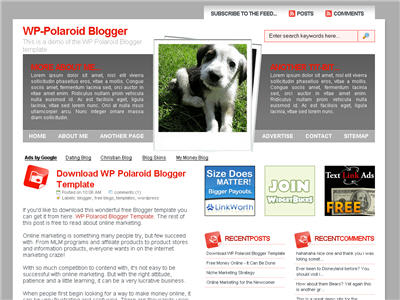
WP-Polaroid Blogger  Template
Demo | Download ]
3 column Blogger template : Blogohblog  
Demo | Download ]
 3 column Mindbreak XML Template for blogger
 [  Demo | Download ]
Forte,3 column Magazine-Style Template for Blogger
  [  Demo | Download ]
Grey-Press Blogger Template 
Demo | Download  ]
I theme Blogger Template Series
Passionduo Professional Blogger Templates Series
Ads Theme Blogger Template
Demo | Download  ]
Free Premium Blogger Template  
 
Demo | Download  ]
Blue Elegant Blogger Template
Demo | Download 
2 column Rumble Blogger Template
Demo | Download  ]