Wednesday, December 31, 2008

Happy new Year 2009 Bloggers!


New year is the great time for the bloggers to look back and see what they have gained during the previous one year of their blogging.Its the time for blogger to plan for their blog for their great blog promotion and Should be able to recognize and overcome the problems of their blog.

On the 1st day of January of 2008 I would like to wish Happy new year to all of my Valuable Readers and wish you have a better blogging life and Hope to live a peaceful life in the year 2009.

Saturday, December 27, 2008

New Design for Bloganol


I have heard that a man is never satisfied of what he has got.It has also become same for me.Previously I was satisfied with my Revolution church blogger Template but after i get the WP max Blogger Template I got plan to change my Old blogger template to new.

I get this Wp max Template from Wordpresstoblogger.blogspot.com by donating $10 o the author.It would take a long time for me to design this template so i prefer to have a Template by donating a little sum of money.

Oh i forgot to say about the good thing for bloganol that is Our Revolution Church Template has been faetured at Btemplates.com at http://btemplates.com/2008/12/26/revolution-church/ and also link to say thanks to u all for supporting me.Hope to give you more Good Contents at Bloganol.

Saturday, December 20, 2008

The result of our Second Contest

First of all I would like to say sorry to all for delaying the result date of this contest because i was out of the city for a week.Previously I have postponed the result date of the contest on the request of our sponsors.Anyway the result of the contest is finally out.

Here goes the name of our winners along with the prizes they have got.

Winner n0 1 : MoreinternetIncome
List of Prizes:
Winner n0 2 : Dhyargacontest
List of Prizes:
Winner n0 3 : Giveawaycity
List of Prizes:
Congratulation to all the winners.If you are the winner then please contact us within 7 days from today to claim your prizes.Have a good day.

Wednesday, December 10, 2008

My money Makers List

Here is the list of my main money making sources which I mainly prefer to make money online during my one year blogging.

Payperpost :
Payperpost is my main money making source.You can make money from Payperpost by writing simple reviews on your blog.You can earn $5-$1000 per review here depending upon your Blog ranking.Blog ranking includes your Google Pagerank , Realrank ,etc

Sponsored reviews:
Sponsored reviews is also like payperpost.You can make money here also by writing simple reviews on your blog.You can earn upto more than $800 per review that you made.Here also your income depends on Your Blog ranking in Linkpro , Technorati and Alexa.

Google Adsense:
Google adsense is a good money making source for blogger.You can earn money money from Google Adsense by showing the Google Ads in the the good place on your blog by using attractive color palette in the ad.Good place includes the top or bottom of your every blog post and in sidebar.The ads are shown according to the Content of the page.Therefore your blog must have Google Adsense High paying Keywords enrich in your post.

This list is changed accordingly to the change in my Top money making sources.

Monday, December 8, 2008

Is you computer Male or it is Female?

You have been using a computer since you were a child.Till that time have you ever tried to find out that your computer is a Male or Female?If no then here are some Tips and reasons that helps you find your used computer is male or Female.Read the following reasons and decide whether your computer is male or Female.

FIVE REASONS TO BELIEVE COMPUTERS ARE FEMALE:

1. No one but the Creator understands their internal logic.

2. The native language they use to communicate with other computers is incomprehensible to everyone else.

3. The message "Bad command or file name" is about as informative as, "If you don't know why I'm mad at you, then I'm certainly not going to tell you."

4. Even your smallest mistakes are stored in long-term memory for later retrieval.

5. As soon as you make a commitment to one, you find yourself spending half your paycheck on accessories for it.


FIVE REASONS TO BELIEVE COMPUTERS ARE MALE:

1. They have a lot of data, but are still clueless.

2. They are supposed to help you solve problems, but half the time they ARE the problem.

3. As soon as you commit to one, you realize that if you had waited a little longer, you could have obtained a better model.

4. In order to get their attention, you have to turn them on.

5. Big power surges knock them out for the rest of the night.

Friday, December 5, 2008

Top Entrecard droppers of November

This time also i have picked the name of top 10 Entrecard droppers of the previous monthe ie November.The name of the Top 10 Droppers goes below.
  1. Apa kamu berani lihat blog saya ini? (29)
  2. Learn how to make money on the internet (28)
  3. Theme lib dot com (21)
  4. Financial Advice and Business News (20)
  5. TV News and Reviews (18)
  6. The Daily Planet (16)
  7. kramlo (13)
  8. chikkador (13)
  9. Willem Kossen's Weblog (13)
  10. Bloghonour (11)
And the top Entrecard dropper of November is Apa kamu berani lihat blog saya ini? with highest 29 drops.The top dropper has been honored with 500 Entrecard credits.

If you aree a new reader then you might not know about our U drop I link system.In this the link of the recent dropper will be displayed in bloganol.Therefore Join our Entrecard drop list or Visit U drop I link page to find the lots of sites to drop your Entrecard in.

Wednesday, December 3, 2008

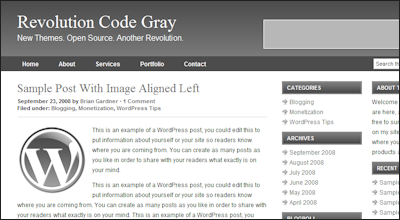
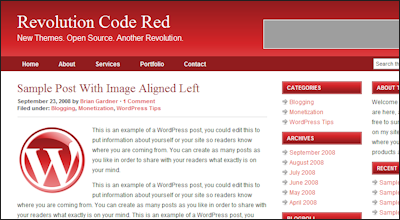
Revolution Code Blogger Templates series

Revolution Code Blue Blogger Template
[ Demo | Download ]


Revolution Code Gray Blogger Template
[ Demo | Download ]


Revolution Code Red Blogger Template
[ Demo | Download ]

Friday, November 28, 2008

Add captions to your Blogger Posts Images

Captions means the short explanation, or description accompanying an illustration or a photograph.Using Captions for images in your blog posts will make you easy to describe that picture.So i have brought you a tutorial that helps you show the captions just below the images in the cool way.

To show the captions to your blog posts images first paste the following code between <head> and </head> Tags in your Template and save your Template.

<style type="text/css">
.caption {
border: 1px solid #DDDDDD;
text-align: center;
background-color: #EEEEEE;
padding: 4px 0px 5px 0px;
-moz-border-radius: 3px;
-khtml-border-radius: 3px;
-webkit-border-radius: 3px;
border-radius: 3px;
}

.caption img {
margin: 0px 0px 5px 0px;
padding: 0px;
border: 0px;
}

.caption p.caption-text {
margin: 0px;
padding: 0px 0px 0px 0px;
font-size: 11px;
font-weight: normal;
line-height: 12px;
}
</style>

After you Save the Template you have to apply the style for the images in the posts.For that use the code in your blog posts as in the same style as below.

<div class="caption" style="width: 410px;"><img src="https://blogger.googleusercontent.com/img/b/R29vZ2xl/AVvXsEjhN4oSj08BlC9LPOy5nsDBlGJ6R1omYj6MKqenibOPoPI_1q9YXAcJLAc4vw_0PMP1NkqSh9v1T28sxjZy76QpW8-TIvYzpVMVQmFn0XFt8U2XDSVMQnPMAyAcM71ERUVzHqEYx1s6SkE/s400/revolution+lifestyle+Blogger+Template.png"/><p class="caption-text">This is the screenshot of the Great Revolution Lifestyle Blogger Template.
</p></div>

Here I have used width 410px for the image.always use width 10px more than the width of the image.Enjoy

Monday, November 24, 2008

Revolution Lifestyle Blogger Template

After Revolution Crunch Blogger Template we have brought you another Magazine style revolution Blogger Template named Revolution Lifestyle Blogger Template.This is also converted from Wordpress theme and the designer of the original Wordpress Theme is Brian Gardner.

This is the screenshot of the Great Revolution Lifestyle Blogger Template.

This Template is also same like the Revolution Crunch Blogger Template.This template is able to recover some of the drawbacks of the Revolution Crunch Blogger Template.The configuration of this template is also same like the configuration of Revolution Crunch Blogger Template.If you need any support or like this Template then please Leave a Comment on this post.

Saturday, November 22, 2008

Social bookmarking widget with opacity effect for blogger

People like to bookmark your blog posts to different social bookmarking sites if they find something interesting content and find the easy bookmarking widget installed in your blog.None of your readers will visit digg or reddit to bookmark your blog there.They will bookmark only when they find social bookmarking widget installed in your blog post footer or other easy place.They will be more interested if they find something interesting with the social bookmarking widget.

This social bookmarking widget is with the opacity effect will really make bookmarking interesting.It means first the image of the widget is seen dim and when the users hover mouse pointer over the image, the image seems brighter.Isn't it interesting?So if you are interested to install this social bookmarking widget with opacity effect follow the simple steps below.I would also like to thank Smartbloggerz who has saved my time by providing me the raw script and images.


Tutorial

From the blogger dashboard after you sign in into blogger Goto Edit Html Section.Check Expand Widget Templates and search for the following code.
<p><data:post.body /></p>

Now replace the above code with the following block of codes.

<p><data:post.body /></p>
<!-- Widget By www.bloganol.com & www.smartbloggerz.com BEGIN -->
<b>Share and Enjoy!</b><br/>
<a class='bookmark' expr:href='&quot;http://digg.com/submit?phase=2&amp;url=&quot; + data:post.url + &quot;&amp;title=&quot; + data:post.title' target='_blank'><img alt='Digg' border='0' src='http://s306.photobucket.com/albums/nn241/deineshd/bookmark16x16/digg.png'/></a>

<a class='bookmark' expr:href='&quot;http://www.stumbleupon.com/submit?url=&quot; + data:post.url + &quot;&amp;title=&quot; + data:post.title' target='_blank'><img alt='Stumble This' border='0' src='http://s306.photobucket.com/albums/nn241/deineshd/bookmark16x16/stumbleupon.png'/></a>

<a class='bookmark' expr:href='&quot;http://del.icio.us/post?url=&quot; + data:post.url + &quot;&amp;title=&quot; + data:post.title' target='_blank' title='Add to Del.icio.us'><img alt='Del.icio.us' border='0' src='http://s306.photobucket.com/albums/nn241/deineshd/bookmark16x16/delicious.png'/></a>

<a class='bookmark' expr:href='&quot;http://www.mixx.com/submit?page_url=&quot; + data:post.url + &quot;&amp;title=&quot; + data:post.title' target='_blank' title='Mixx It'><img alt='Mixx' border='0' src='http://s306.photobucket.com/albums/nn241/deineshd/bookmark16x16/mixx.png'/></a>

<a class='bookmark' expr:href='&quot;http://www.furl.net/storeIt.jsp?u=&quot; + data:post.url + &quot;&amp;t= &quot; + data:post.title' target='_blank' title='Add to Furl'><img alt='Furl' border='0' src='http://s306.photobucket.com/albums/nn241/deineshd/bookmark16x16/furl.png'/></a>

<a class='bookmark' expr:href='&quot; http://www.propeller.com/submit/?U=&quot; + data:post.url + &quot;&amp;T= &quot; + data:post.title' target='_blank' title='Propeller'><img alt='Propeller' border='0' src='http://s306.photobucket.com/albums/nn241/deineshd/bookmark16x16/propeller.gif'/></a>

<a class='bookmark' expr:href='&quot;http://www.simpy.com/simpy/LinkAdd.do?href= &quot; + data:post.url + &quot;&amp;title=&quot; + data:post.title' target='_blank' title='Add to Simpy'><img alt='Simpy' border='0' src='http://s306.photobucket.com/albums/nn241/deineshd/bookmark16x16/simpy.png'/></a>

<a class='bookmark' expr:href='&quot;https://favorites.live.com/quickadd.aspx?marklet=1&amp;url= &quot; + data:post.url + &quot;&amp;title=&quot; + data:post.title' target='_blank' title='Live'><img alt='Live' border='0' src='http://s306.photobucket.com/albums/nn241/deineshd/bookmark16x16/live.png'/></a>

<a class='bookmark' expr:href='&quot;http://twitthis.com/twit?url= &quot; + data:post.url + &quot;&amp;title=&quot; + data:post.title' target='_blank' title='Twitthis'><img alt='Twitthis' border='0' src='http://s306.photobucket.com/albums/nn241/deineshd/bookmark16x16/twitter.png'/></a>

<a class='bookmark' expr:href='&quot;http://slashdot.org/bookmark.pl?url= &quot; + data:post.url + &quot;&amp;title=&quot; + data:post.title' target='_blank' title='Slashdot'><img alt='Add To Slashdot' border='0' src='http://s306.photobucket.com/albums/nn241/deineshd/bookmark16x16/slashdot.png'/></a>

<a class='bookmark' expr:href='&quot;http://www.spurl.net/spurl.php?url=&quot; + data:post.url + &quot;&amp;title=&quot; + data:post.title' target='_blank' title='Add to Spurl'><img alt='Spurl' border='0' src='http://s306.photobucket.com/albums/nn241/deineshd/bookmark16x16/spurl.png'/></a>

<a class='bookmark' expr:href='&quot;http://www.google.com/bookmarks/mark?op=edit&amp;bkmk=&quot; + data:post.url + &quot;&amp;title=&quot; + data:post.title' target='_blank' title='Bookmark To Google'><img alt='Google' border='0' src='http://s306.photobucket.com/albums/nn241/deineshd/bookmark16x16/googlebookmark.png'/></a>

<a class='bookmark' expr:href='&quot;http://myweb2.search.yahoo.com/myresults/bookmarklet?u= &quot; + data:post.url + &quot;&amp;=&quot; + data:post.title' target='_blank' title='Add to Yahoo web'><img alt='Yahoo' border='0' src='http://s306.photobucket.com/albums/nn241/deineshd/bookmark16x16/yahoo.gif'/></a>

<a class='bookmark' expr:href='&quot;http://reddit.com/submit?url=&quot; + data:post.url + &quot;&amp;title= &quot; + data:post.title' target='_blank' title='Add to Reddit'><img alt='Reddit' border='0' src='http://s306.photobucket.com/albums/nn241/deineshd/bookmark16x16/reddit.png'/></a>

<a class='bookmark' expr:href='&quot;http://technorati.com/faves?add= &quot; + data:post.url' target='_blank' title='Add to Technorati'><img alt='Technorati' border='0' src='http://s306.photobucket.com/albums/nn241/deineshd/bookmark16x16/technorati.png'/></a>

<a class='bookmark' expr:href='&quot;http://www.blinklist.com/index.php?Action=Blink/addblink.php&amp; Description=&amp;Url=&quot; + data:post.url + &quot;&amp;Title=&quot; + data:post.title' target='_blank' title='Add to Blinklist'><img alt='Blinklist' border='0' src='http://s306.photobucket.com/albums/nn241/deineshd/bookmark16x16/blinklist.png'/></a>

<a class='bookmark' expr:href='&quot;http://blogmarks.net/my/new.php?mini=1&amp;simple=1&amp; url=&quot; + data:post.url + &quot;&amp;title=&quot; + data:post.title' target='_blank' title='Add to Blogmarks'><img alt='Blogmarks' border='0' src='http://s306.photobucket.com/albums/nn241/deineshd/bookmark16x16/blogospherenews.gif'/></a>

<a class='bookmark' expr:href='&quot;http://smarking.com/editbookmark/?url=&quot; + data:post.url' target='_blank' title='Add to Smarkings'><img alt='Smarkings' border='0' src='http://s306.photobucket.com/albums/nn241/deineshd/bookmark16x16/smarking.png'/></a>

<a class='bookmark' expr:href='&quot;http://ma.gnolia.com/bookmarklet/add?url=&quot; + data:post.url + &quot; &amp;title=&quot; + data:post.title' target='_blank' title='Add to Ma.gnolia'><img alt='Ma.gnolia' border='0' src='http://s306.photobucket.com/albums/nn241/deineshd/bookmark16x16/magnolia.png'/></a>

<a class='bookmark' expr:href='&quot;http://www.sphere.com/search?q=sphereit:&quot; + data:post.url + &quot;&amp;title=&quot; + data:post.title' target='_blank' title='SphereIt'><img alt='SphereIt' border='0' src='http://s306.photobucket.com/albums/nn241/deineshd/bookmark16x16/sphere.png'/></a>

<a class='bookmark' expr:href='&quot;http://sphinn.com/submit.php?url=&quot; + data:post.url + &quot; &amp;title=&quot; + data:post.title' target='_blank' title='Sphinn'><img alt='Sphinn' border='0' src='http://s306.photobucket.com/albums/nn241/deineshd/bookmark16x16/sphinn.png'/></a>

<a class='bookmark' expr:href='&quot;http://feedmelinks.com/categorize?from=toolbar&amp; op=submit&amp;name=&quot; + data:post.title + &quot;&amp;url=&quot; + data:post.url' target='_blank' title='Add to Feedmelinks'><img alt='Feedmelinks' border='0' src='http://s306.photobucket.com/albums/nn241/deineshd/bookmark16x16/feedmelinks.png'/></a>
<!-- Widget By www.bloganol.com & www.smartbloggerz.com END -->

Now in second step paste the following style code between <head> and </head> section in your Template.


<style type="text/css">

.bookmark img{
filter:progid:DXImageTransform.Microsoft.Alpha(opacity=50);
-moz-opacity: 0.5;
}

.bookmark:hover img{
filter:progid:DXImageTransform.Microsoft.Alpha(opacity=100);
-moz-opacity: 1;
}

.bookmark img{
border: 0px solid #ccc;
}
</style>


After you complete the above steps save your template.Then you're done.

Wednesday, November 19, 2008

Spice up your gmail inbox with new themes and colors

After making voice and video chat possible with gmail,Gmail has launched 30 odd themes four your styling your gmail inbox.These themes includes a shiny theme with chrome styling, another one that turns your inbox into a retro notepad, nature themes that change scenery over time, weather driven themes that can rain on your mailbox, and fun characters to keep you in good company.There's even an old school ascii theme (Terminal) which was the result of a bet between two engineers.They have also done a minor facelift to Gmail's default look to make it crisper and cleaner .
To customize your inbox, go to the Themes tab under Settings.Then choose your favorite then apply that theme for your gmail inbox.once you apply your favorite theme you can again chance it and can restore your theme to default.

Monday, November 17, 2008

U Drop I link

The following links are of our recent Entrecard droppers.This link is shown using the Entrecard recent Droppers Feed and Feedburner.The Link of the recent droppers will be automatically shown when users drop their Entrecard on our blog.


Recent Droppers


Saturday, November 15, 2008

Top 20 replies by programmers when their programs don't work:

I think I have written lots of posts on Free Blogger Templates, Blogger hacks and other Topics related to blogging.But this time am I trying to go beyond blogging and make you laugh with this cool Joke related to a programmer.If you have not read it before then you will surely laugh at it and if you have already read this before then Try to laugh at this joke again.
Top 20 replies by programmers when their programs don't work:
  • 20. "That's weird..."
  • 19. "It's never done that before."
  • 18. "It worked yesterday."
  • 17. "How is that possible?"
  • 16. "It must be a hardware problem."
  • 15. "What did you type in wrong to get it to crash?"
  • 14. "There is something funky in your data."
  • 13. "I haven't touched that module in weeks!"
  • 12. "You must have the wrong version."
  • 11. "It's just some unlucky coincidence."
  • 10. "I can't test everything!"
  • 9. "THIS can't be the source of THAT."
  • 8. "It works, but it hasn't been tested."
  • 7. "Somebody must have changed my code."
  • 6. "Did you check for a virus on your system?"
  • 5. "Even though it doesn't work, how does it feel?
  • 4. "You can't use that version on your system."
  • 3. "Why do you want to do it that way?"
  • 2. "Where were you when the program blew up?"
  • 1. And the Number One Reply by Programmers when their programs don't work: "I thought I fixed that."
  • Friday, November 14, 2008

    New Updates made on Twittad that helps you maximize your Twittad Income

    It has been a long time that I have been telling you that all the twitter users can make money with their twitter profile by displaying background image ads on their twitter profile.Now twitter has even added two more new features that helps you maximize your Twittad income and those new features are Twittad Affiliate Program and “1-Tweet Promotion” .

    Affiliate Program:
    Now when you log into your twittad account you can see new affiliate section in your account.from there you can get the affiliate links and banners.You can get single affiliate link but you can get banners in two different sizes : 468X60px and 200X200px Iframe banner.Each referral you send our way will be tracked via your affiliate code. You will earn 25% of transaction fees over the life of the Twittad user. Once your account hits $30 you can request payment from Twittad.

    “1-Tweet Promo”: When an advertiser purchases a Twitter users background for ad placement through Twittad, they will be allowed 1 Tweet message to announce the purchase. This is a pre-formed Tweet from Twittad that we send using the seller’s Twitter credentials. The Tweet will look like this:

    “Hey! My background is Sponsored is Apple. Check out http://www.apple.com"

    This 1 Tweet promo is exactly that, only one message is sent after the ad has been placed by the Twitter user, and no further messages are sent after that.

    So if you want to make money online with twittad then sign up to twittad now.

    Now do Voice and Video Chat with Gmail

    Google Scientists are working days and night in their Labs to invent and add new and new features to Gmail that could bring Gmail to more higher position. So in this process they discovered new theory and made Video chat possible on Gmail .
    Voice and Video chat is the recently added Feature in Gmail.You must have the browsers installed in your System that could support new version of Gmail to access this service.Some examples of these types of browsers are FF 2.0+, IE 6.0+, Safari 3.0+, and Google Chrome.

    Its really easy to setup and access Gmail new Video chat with your Gmail account for that
    • Download the Gmail voice and video chat plug-in, quit all open browser windows, and install the plug-in.
    • Sign in to Gmail.
    • In the Chat section of your Gmail, select the contact you want to call. If they have a camera icon next to their name, you can make a voice or video call to them; just click Video & more.


    Monday, November 10, 2008

    Give style to your Blog Link Titles

    NiceTitle is a relatively simple script that creates a div-container that pops up when a link (with the title attribute is hovered. This script shows the title of the link plus the URL links redirect to when the links are hovered.

    How to Set Up this Script?
    Setting up this script is also same like adding other codes in Blogger.You just need to Paste the CSS plus JavaScript code in your blog Code Section.To setup this script in your blog Just follow the simple steps below.

    1. Download nicetitle.js and Upload it to your Googlepages account.

    2. After that Goto Edit Html Page from your Blogger Dashboard after you Log in to your Blogger Account.

    3. After that add the following lines of code just before </head> in your Template.
    <script type="text/javascript" src="nicetitle.js"></script>
    4. Next step is you should add style to this Script.For that Add the following block of codes just above ]]</b:skin> in your Template.

    div.nicetitle {
    background-color: #A38531;
    color: #fff;
    font: bold 13px "Trebuchet MS", Verdana, Arial, sans-serif;
    padding: 4px;
    position: absolute; top: 0; left: 0;
    text-align: left;
    width: 25em;
    z-index: 20;
    }

    div.nicetitle p {
    margin: 0;
    padding: 0 3px;
    }

    div.nicetitle p.destination {
    font-size: 9px;
    padding-top: 3px;
    text-align: left;
    }
    After you complete the above steps Save your Template and don't forget to use Title in your Links.If you have any questions then simply tell us about it either by Commenting or Contacting us.

    Thursday, November 6, 2008

    Revolution Church Template for Blogger

    Revolution Church is originally a magazine style wordpress theme designed by Brian Gardner and we have converted for all blogger users.It is 3 column fixed and is optimized for advertising.Click here for free demo.

    Download now

    Total Downloaded: Times

    Features of this Template:
    1. This Template is 3 column fixed with Sidebars at right.
    2. This Template is optimized for advertising.It has got more than 4 perfect areas for advertising.
    3. It has got inbuilt site-search Engine.
    4. This Template has got date widget at Top left that shows the current date.
    5. This Template has got two CSS Menus.
    6. This Template is a magazine style template and has got the professional look.


    Top Menu Configuration

    To customize Top Menu , find the following code and edit with your own link.
    <div id='NavbarMenuleft'>
    <ul id='nav'>
    <li><a expr:href='data:blog.homepageUrl'>Home</a></li>
    <li>
    <a href='#'>Sample Page</a>
    <ul>
    <li>
    <a href='#'>Sub Page #1</a>
    <ul>
    <li><a href='#'>Sub Sub Page #1</a></li>
    <li><a href='#'>Sub Sub Page #2</a></li>
    <li><a href='#'>Sub Sub Page #3</a></li>
    </ul>
    </li>
    <li><a href='#'>Sub Page #2</a></li>
    <li><a href='#'>Sub Page #3</a></li>
    <li><a href='#'>Sub Page #4</a></li>
    <li><a href='#'>Sub Page #5</a></li>
    </ul>
    </li>
    <li><a href='#'>Sample Post</a></li>
    <li><a href='#'>Blog Page</a></li>
    </ul>
    </div>
    Sub Menu Configuration

    To customize Top Menu , find the following code and edit with your own link.But if you are a Google Adsense user then i suggest you to use long Link unit here.
    <div id='subnavbar'>
    <ul id='subnav'>
    <li>
    <a href='#'>Community Events</a>
    <ul>
    <li>
    <a href='#'>Sub Category #1</a>
    <ul>
    <li>
    <a href='#'>Sub Sub Category #1</a>
    </li>
    <li>
    <a href='#'>Sub Sub Category #2</a>
    </li>
    <li>
    <a href='#'>Sub Sub Category #3</a>
    </li>
    </ul>
    </li>
    <li>
    <a href='#'>Sub Category #2</a>
    </li>
    <li>
    <a href='#'>Sub Category #3</a>
    </li>
    </ul>
    </li>
    <li>
    <a href='#'>Conferences</a>
    </li>
    <li>
    <a href='#'>Get Connected</a>
    </li>
    </ul>
    </div>

    New design for Bloganol

    Since many days I was not writing any post on bloganol because I was busy designing new Template for bloganol.Now I have already created Template and Uploaded in Bloganol.It means i am back in work.

    This template is inspired from Revolution Crunch Wordpress theme.I selected this theme to use in my blog because it is adsense friendly.It means i have discovered 4 best places to show your adsense ad that is in the right header , Submenu, Sidebar and between the posts or between post and comment block.It means that it will surely help me earn more revenue through Google adsense.It has also got cool CSS Menu and good looking comment area.

    I think this template looks more professional than the previous template.If you think this template is good then i will surely make this template download to everyone for making some more modifications.

    Friday, October 31, 2008

    Top 10 Entrecard Droppers of Octuber 08

    From the previous month we are honoring our Top 10 Entrecard Dropper.In this process we are link loving our Top 10 droppers and we are giving 500 Entrecard Credits to our Top Dropper.
    From the above Table our Top Dropper for October is Money Saving pro with 23 Drops.I have already sent the credits to our Top Dropper.The name of the droppers goes below.I have added rel='dofollow' in the code section to link love our Top droppers.


    Unfortunately I found that the Entrecard widget in two Blogs All Computer Tips and All healthy Tips has been deleted.So this time Only 8 Top Droppers has been Shown.So Drop and Stay Tuned to Bloganol.

    Thursday, October 30, 2008

    Good bye Blogrush

    This morning I got an Email from Blogrush after a couple of Months and I came to know that our famous traffic maker service Blogrush is going to shut Down.I felt sad to read about it.Blogrush used to be a good Traffic maker for my blog once but after I started using Entrecard I stopped using Blogrush and pay my more attention to Entrecard.

    When I visited Blogrush homepage I saw the same message in the homepage as in the email.They don't clearly mention the cause why they were shutting down but it was bad for them and for us too.

    So if you have Blogrush widget code on your blog then remove it. and hope to get other more better services for blogging from Blogrush.

    Tuesday, October 28, 2008

    Making Money with Motive network Advent 2.0.

    Today while I visited John chow blog after a week I found a useful post on making real Money Online with Motive Network advent 2.0.I found a useful post in Johnchow after a week so I blogged about the title Making Money with Motive network Advent 2.0.

    The features of the Motive Network Advent 2.0 was really impressive.It has got highest payouts along with top performing offers.It has reliable payment schedule and host and post offers.It is also best in class interface.It has got Advanced tracking and reporting and registration path technology.Further it has also got SID and AID tracking, Multiple ad formats and ability to customize and super customer service.

    To get better sense about Motive Network watch the video and know that what can you expect from Motive network.


    I have already sign up to Motive Network and waiting for approval.Therefore Sign up to Motive Network today and start making Money now.

    Thursday, October 23, 2008

    2008 Blogger's choice awards winners announced

    This morning I got an Email from Izea.The email was about announcement of the winners of Blogger choice awards 2008.So I visited the Link at Blogger's choice awards winners 2008 and see all the award winning Blog but I didn't find my blog anywhere,So sad.Anyway your blog may be in the award winners list if you have participated to Blogger's choice awards so see Blogger's choice awards winners 2008 Today.

    Now the voting for 2008 has been officially closed but now voting for 2009 has now opened.Therefore sign up Blogger's choice award, Nominate your blog to any category and Try to get in list of award winners in 2009.Good luck.

    Wednesday, October 22, 2008

    Our new Contest Blog : Blog about Contests

    After organizing contest for twice I really start loving contests.Therefore we have now started new contest blog http://www.blogaboutcontests.com/ in order to organize and participate in more contests.it has also become an experimental blog for us.We will try to feature all the contest around the web in this blog whether it is small or bigger.

    If you like to get your contest featured in this blog then submit your contest to us and after reviewing the contest we will surely feature it here and don't forget to participate in the new contest organized by Bloganol titled Win prizes worth over $100 plus  Entrecard credits over 15000.

    Monday, October 20, 2008

    Win prizes worth over $100 plus Entrecard Credits over 15000

    This is the second contest organized by Bloganol.In the previous contest we got total 52 participants.In this contest we are hoping to get more contestants because we are trying to make it bigger than previous.

    How to participate here?
    There are altogether 200 points for completing easy 7 tasks in this contest.Each task has got certain points.here are lists of tasks the participants should complete with the points.
    1. Blog about the contest (50 points).
    2. Subscribe Bloganol Feed by Email (35 points).
    3. Follow us at Twitter (25 points).
    4. Fave Bloganol on Technorati (25 points).
    5. Join our Entrecard Drop List (20 points).
    6. Join our Mybloglog Community (15 points).
    7. Put banner of Bloganol on you blog Until the contest runs(30 points).
    Make lots of prizes at Bloganol
    <a href="http://www.bloganol.com/2008/10/win-prizes-worth-over-100-plus-14000.html" title="Win lots of prizes at Bloganol" target="_blank">
    <img src="http://entrecard.s3.amazonaws.com/eimage/87432.jpg" alt="Make lots of prizes at Bloganol" /></a>


    list of prizes


    1st Prize
    2nd Prize
    3rd prize

    These are the small list of prizes and we would like to thank all the sponsors who sponsored here.If anyone still likes to sponsor here then its not late.We accept sponsors until the result of the Contest.You can Email us about the prize you' re sponsoring with your blog link.You can sponsor Ec's (1000 min),Banner or Text Link in your blog,Review on your blog or other cool things related to Blogging.


    Deadline
    There is no date specified for opening the result of the contest.Since this contest is post no 200.So post no 119 will be the warning post and Post no 220 will be the result post of this contest.It means it would be within 15-20 days.So stay tuned to Bloganol.

    December 15th 2008
    Sorry for postponing the dates of contest result.I have postponed on the request of my Sponsors.

    Sunday, October 19, 2008

    Make Money with TTZ Media affiliate

    TTZ Media is also sometime called Johnchow Ad Media Network.You can make Money from TTZ Media Affiliate by being a TTZ Media Affiliate marketer on your relevant website through PPC earnings.They provide a very intuitive ad code generation system as well as a tracking system, and the ad banners are one of the most flexible on the web.

    But there are also some requirements of TTZ Media to get your Blog approved .
    1. You must have your own domain name (no free sites).
    2. Your Blog must be in English Language. 
    3. Your Blog must have high Quality Content and
    4. Your Blog must be Updated Frequently.
    If you Qualify the above requirement then you can Sign up to TTZ Media.If you don't  qualify the above requirements then Try to take your blog to higher level.

    The Ads shown by TTZ Media Network are also like Ads of Shopping Ads and Chitika Network.You can get Ads on different 15 sizes and single Products and Multi products.Following is the Snapshot of the Ad of TTZ Media Network.

    Comment numbering in Blogger

    Last day when I was converting a wordpress theme into Blogger I saw the comment numbering in the wordpress theme and I tried to show the Comment numbering in that Blogger Theme.So I searched the hack to show comment numbering and Finally found that hack in randomness.

    It was not so hard to show comment numbering in Blogger.It is just like showing commentators photo inside comments in Blogger.So I have brought this hack to you.Just follow the tutorial below.

    Goto Blogger Edit Html page , Expand Widget Templates and Search for the Following block of codes.

    <dl id='comments-block'>
    <b:loop values='data:post.comments' var='comment'>
    <dt class='comment-author' expr:id='"comment-" + data:comment.id'>
    <a expr:name='"comment-" + data:comment.id'/>
    <b:if cond='data:comment.authorUrl'>
    <a expr:href='data:comment.authorUrl' rel='nofollow'><data:comment.author/></a>
    <b:else/>
    <data:comment.author/>
    </b:if>
    <data:commentPostedByMsg/>
    </dt>
    <dd class='comment-body'>
    <b:if cond='data:comment.isDeleted'>
    <span class='deleted-comment'><data:comment.body/></span>
    <b:else/>
    <p><data:comment.body/></p>
    </b:if>
    </dd>
    <dd class='comment-footer'>
    <span class='comment-timestamp'>
    <a expr:href='"#comment-" + data:comment.id' title='comment permalink'>
    <data:comment.timestamp/>
    </a>
    <b:include data='comment' name='commentDeleteIcon'/>
    </span>
    </dd>
    </b:loop>
    </dl>

    Now in second step , replace the above block of codes with the following block of codes.

    <dl id='comments-block'>

    <script type='text/javascript'>var CommentsCounter=0;</script>

    <b:loop values='data:post.comments' var='comment'>

    <div class='' expr:id='data:comment.id'>

    <dt expr:class='"comment-author " + data:comment.authorClass' expr:id='data:comment.anchorName'>
    <a expr:name='data:comment.anchorName'/>
    <b:if cond='data:comment.authorUrl'>
    <a expr:href='data:comment.authorUrl'><data:comment.author/></a>
    <b:else/>
    <data:comment.author/>
    </b:if>
    <data:commentPostedByMsg/>

    <span class='comment-number'>
    <a expr:href='"#comment-" + data:comment.id' title='Comment Link'>
    <script type='text/javascript'>
    CommentsCounter=CommentsCounter+1;
    document.write(CommentsCounter)
    </script>
    </a>
    </span>

    </dt>
    <dd class='comment-body'>
    <b:if cond='data:comment.isDeleted'>
    <span class='deleted-comment'><data:comment.body/></span>
    <b:else/>
    <p><data:comment.body/></p>
    </b:if>
    </dd>
    <dd class='comment-footer'>
    <span class='comment-timestamp'>
    <a expr:href='data:comment.url' title='comment permalink'>
    <data:comment.timestamp/>
    </a>
    <b:include data='comment' name='commentDeleteIcon'/>
    </span>
    </dd>

    </div>

    </b:loop>
    </dl>

    Now in last Step you need to style the numbering.For that add the following codes just above ]]></b:skin>: in your Template.

    .numberingcomments{
    float: right;
    display: block;
    width: 50px;
    margin-right: 5px;
    margin-top: -35px; /*comments-counter position*/
    text-align: right;
    font-family: 'Century Gothic','Lucida Grande',Arial,Helvetica,Sans-Serif;
    font-size: 30px;
    font-weight: normal;
    }

    /*since the numbers are actually links, we need to force the color properties*/

    .numberingcomments a:link, .numberingcomments a:visited {color: #445566 !important; text-decoration: none !important;}
    .numberingcomments a:hover, .numberingcomments a:active {color: #FF9933 !important; text-decoration: none !important;}

    After you complete the above steps,Save the Template and see the comment numbering in your blog.If yu got any problem then let us know about it.

    New Banner Design for Bloganol

    Well previously I was using my own designed 125X125px banner For Entrecard and Other Advertising.I get fed up of the Old banner and planned to get another cool Banner for my blog.This time I Uninstalled Photoshop from my PC to gave Job to Bloggingfromscratch for Designing my Banner.They proposed my 6 banner designs and I choose 1 banner for my blog.And the new Banner Looks Like this:


    Enjoy.

    Make a mark on Mozilla with Impact Mozilla Challenge

    Mozilla has opened a contest named " Impact Mozilla Contest" that gives you a great chance to mark yourself on Mozilla.They're looking for innovative ways to make sure people who download Firefox become regular users.

    So if you're interested here then start send your summary of your ideas and an overview of how you and your team will carry them out. If your initial strategy makes the cut, They'll ask for a complete plan detailing your solution.

    If your plan is selected as the winner, you'll have the opportunity to manage a marketing campaign for one of the top brands in the technology world. They'll give you the resources to enact your solution, plus $3,000 for the winning proposal

    So learn the brief of the contest at First.Then know about the rules and prizes then submit your Plan with two page summaries to Mozilla before October 24 2008.So its a great chance to promote your blog and yourself.Therefore don't miss this chance.

    Saturday, October 18, 2008

    Show Commentators Photo inside comments in Blogger

    This is just another and important hack in the Bloggers hacks directory.This hack helps you show the photo of the commentator embedded on the left side of the comment or below the commentator's name.I have also performed this hack in my blog.Now whenever Blogger users comment in my blog with their Blogger Profile then their photo will be obviously shown in the left side of their comment just like below.

    Isn't it great?It has got many features like:It attracts more users to Comment on your blog,Makes your blog professional looking and the comments seem easy to manage.It is not so hard to perform this hack in your blog.For that you must follow the following tutorial.

    First of all copy the following code and Paste it in your blog Just above </head> tag.

    <script src='http://bloganolutilities.googlepages.com/blogger_comment_photos.js' type='text/javascript'/>
    <script type='text/javascript'>
    //<![CDATA[
    addLoadEvent(function(){showCommentPhotos('commentphoto','comment-author', 1);});
    //]]>
    </script>


    Now in Second step search for the following Block of code.

    <dl id='comments-block'>
    <b:loop values='data:post.comments' var='comment'>
    <dt class='comment-author' expr:id='"comment-" + data:comment.id'>
    <a expr:name='"comment-" + data:comment.id'/>
    <b:if cond='data:comment.authorUrl'>
    <a expr:href='data:comment.authorUrl' rel='nofollow'><data:comment.author/></a>
    <b:else/>
    <data:comment.author/>
    </b:if>
    <data:commentPostedByMsg/>
    </dt>
    <dd class='comment-body'>
    <b:if cond='data:comment.isDeleted'>
    <span class='deleted-comment'><data:comment.body/></span>
    <b:else/>
    <p><data:comment.body/></p>
    </b:if>
    </dd>
    <dd class='comment-footer'>
    <span class='comment-timestamp'>
    <a expr:href='"#comment-" + data:comment.id' title='comment permalink'>
    <data:comment.timestamp/>
    </a>
    <b:include data='comment' name='commentDeleteIcon'/>
    </span>
    </dd>
    </b:loop>
    </dl>

    After you Find searching the whole block of code,select the Codes and replace it with the following block of codes.

    <dl id='comments-block'>
    <b:loop values='data:post.comments' var='comment'>
    <dt class='comment-author' expr:id='"comment-" + data:comment.id'>
    <a expr:name='"comment-" + data:comment.id'/>
    <b:if cond='data:comment.authorUrl'>
    <a expr:href='data:comment.authorUrl' rel='nofollow'><data:comment.author/></a>
    <b:else/>
    <data:comment.author/>
    </b:if>
    <data:commentPostedByMsg/>
    </dt>
    <dd class='comment-body'>
    <div class='commentphoto' style='float:left;margin:5px;'/>
    <b:if cond='data:comment.isDeleted'>
    <span class='deleted-comment'><data:comment.body/></span>
    <b:else/>
    <p><data:comment.body/></p>
    </b:if>
    </dd>
    <dd class='comment-footer'>
    <span class='comment-timestamp'>
    <a expr:href='"#comment-" + data:comment.id' title='comment permalink'>
    <data:comment.timestamp/>
    </a>
    <b:include data='comment' name='commentDeleteIcon'/>
    </span>
    </dd>
    <div style='clear:both;'/>
    </b:loop>
    </dl>

    After you replace the code Save your the Template and see the photos of your Commentators.Enjoy.

    Thursday, October 16, 2008

    20 Firefox 3 Themes you must Try

    I think I have already delivered you 25 coolest Firefox wallpapers now this time i am going to deliver you 20 Firefox 3 Themes that you must try.

    iPox - Mozilla Firefox Theme
    [ Visit Designer | Add to Firefox ]

    MidnightFox - Dark Firefox Theme
    [ Visit Designer | Add to Firefox ]

     Introducing MidnightFoxy - Dark & Stylish Theme
     [ Visit Designer | Add to Firefox ]

    Miint Firefox Theme
     [ Visit Designer | Add to Firefox ]

     iPox Aqua - Blue Firefox Theme
      [ Visit Designer | Add to Firefox ]

    PinkHope - Breast Cancer Awareness Firefox Theme
      [ Visit Designer | Add to Firefox ]

    HalloFF - Halloween Firefox Theme
      [ Visit Designer | Add to Firefox ]

    NASA Night Launch
      [  Add to Firefox ]

    Newgrounds Classic 2.027
      [  Add to Firefox ]

    CrystalFox Modern 2.0
      [ Add to Firefox ]

     Phoenity Reborn 0.8.100
       [  Add to Firefox ]

    Aero Fox 3.0.2
        [  Add to Firefox ]

     Abstract Zune 3.0.1
         [  Add to Firefox ]

    Aero Silver Fox 3.0.2
    Add to Firefox ]

     Walnut for Firefox
     [  Add to Firefox ]

    Bible Fox 3.0.1
    [ Add to Firefox ]

     Iowa State Cyclones Theme 3.0.1
     
    Noia 2.0 (eXtreme) 3.52
     [ Add to Firefox ]

    Noia 2.0 (lite) 3.21
      [ Add to Firefox ]

     Whitehart 3.4
       [ Add to Firefox ]